

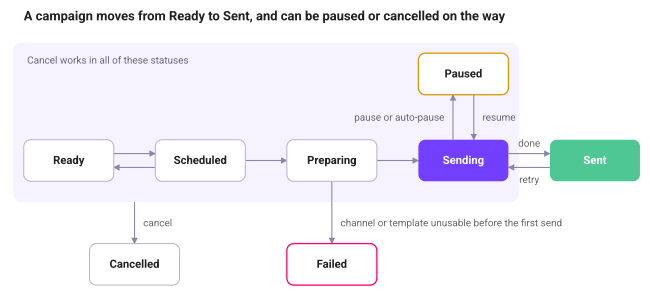
A campaign has eight statuses. The status filter in the overview uses the same names.
Status | Meaning | What you can do |
|---|---|---|
Ready | Saved, no send time. Never starts by itself. | Edit, Send now, Cancel, Delete |
Scheduled | Has a send time. May wait past it if another campaign is sending on the channel or the quality rating is red. | Edit (choose Decide later to unschedule), Cancel |
Preparing | The send moment has come and the audience is being worked out from the lists. | Cancel |
Sending | Messages are going out at 20 per second. | Pause, Cancel |
Paused | Stopped by you or automatically. The reason is shown on the campaign page. Frees the channel. | Resume, Cancel |
Sent | Every recipient has been processed. Receipts keep arriving for 24 hours. | Retry failed, Download report, Opt out undelivered, Delete |
Cancelled | Stopped for good. Messages already sent stay sent. | Download report, Delete |
Failed | Could not start, for example because the channel or template became unusable, nobody was reachable, or a list grew past 15,000. | Retry failed, Download report, Opt out undelivered, Delete |
Retry failed sends the campaign back to Sending for the messages WhatsApp never accepted. It follows the same channel rules as Resume.
Cancelling
Cancelling stops what is not sent yet. Messages already handed to WhatsApp cannot be recalled. They finish and are reported as sent.
Where to find the actions
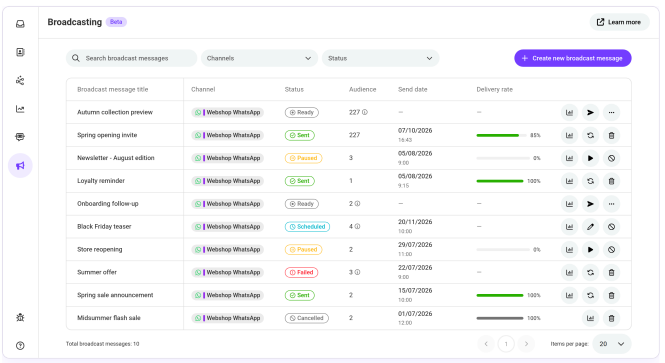
The overview list has every action: Statistics, Send now, Pause, Resume, Retry failed, Edit, Cancel and Delete. Each row shows up to three buttons; the rest are under the ⋯ menu. Cancel, delete, retry and send now ask for confirmation; pause and resume do not.
Deleting removes a finished, cancelled, failed or ready campaign from the list and its statistics are no longer available. The messages it sent stay in the conversations.