

A campaign reaches at most 15,000 recipients, counted after duplicates are merged. A bigger audience is refused, never cut short, so split it over several campaigns. You can mix contact lists, single contacts and typed numbers in one campaign.
Lists are read at send time
Contact lists are looked up when the campaign actually starts, not when you save it. Someone added to a list an hour before the send still gets the message, and someone removed does not. That is why the audience size is an estimate until the campaign starts. If a list grows past 15,000 before the send, the campaign fails and shows the reason.
Everyone gets one message
Recipients are merged by WhatsApp number. A typed number that belongs to an existing contact counts as that contact. The audience summary shows how many were merged. Merging works within one campaign only: two campaigns with overlapping audiences both send. A person with two numbers gets two messages.
Who is left out, and why
Reason shown | Meaning |
|---|---|
Blocked | The contact is blocked in Saysimple. |
Opted out | The contact opted out of campaigns. A typed number that belongs to an opted-out contact is left out too. |
No WhatsApp number | The contact has no usable WhatsApp number or ID. |
Not reachable on this channel | The contact is known only by an ID that this channel cannot message. |
Missing value for {variable} | The contact has no value for a personalisation field. |
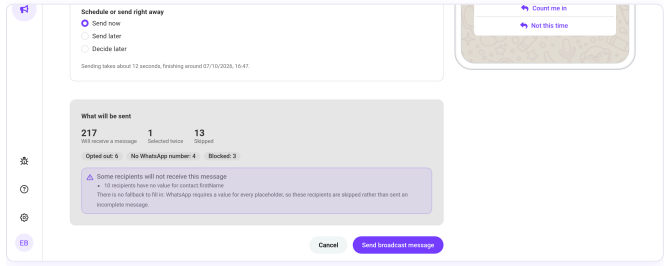
Blocked and opted-out status is checked again for each person at the moment of sending. A contact deleted during a send is skipped as well.
Messaging limits · Meta channels only
WhatsApp limits how many new conversations a number can start per day: 50, 250, 1,000, 10,000, 100,000 or unlimited. If your audience is larger than your number's limit, the form warns you that WhatsApp will deliver the rest later. The campaign is not blocked.